Skip to content
石头软件测试技术分享石头软件测试技术分享
主页
github icon
  • cicd

    • 传统项目部署

      • 持续集成/持续发布
        • jenkins简介
          • jenkins项目部署
          • 容器化部署

            • jenkins打包dokcer镜像
              • jenkins升级rancher服务
              • 工具集成

                • jenkins集成jmeter
                  • jenkins集成allure
                    • jenkins分发资源
                      • 钉钉消息发送
                        • 参考文档
                          • 获取自定义机器人Webhook
                            • 选择设置
                              • 选择智能群助手
                                • 添加机器人
                                  • 选择自定义机器人
                                    • 获取Webhook地址
                                      • 复制地址
                                      • 发送代码
                                        • python版本
                                          • java版本

                                    钉钉消息发送

                                    author icon石头calendar icon2022年2月20日category icon
                                    • 持续集成/持续发布
                                    tag icon
                                    • jenkins
                                    timer icon大约 1 分钟

                                    此页内容
                                    • 参考文档
                                    • 获取自定义机器人Webhook
                                      • 选择设置
                                      • 选择智能群助手
                                      • 添加机器人
                                      • 选择自定义机器人
                                      • 获取Webhook地址
                                      • 复制地址
                                    • 发送代码
                                      • python版本
                                      • java版本

                                    # 钉钉消息发送

                                    # 参考文档

                                    参考文档: https://open.dingtalk.com/document/robots/custom-robot-accessopen in new window

                                    # 获取自定义机器人Webhook

                                    # 选择设置

                                    img_15.png

                                    # 选择智能群助手

                                    img_8.png

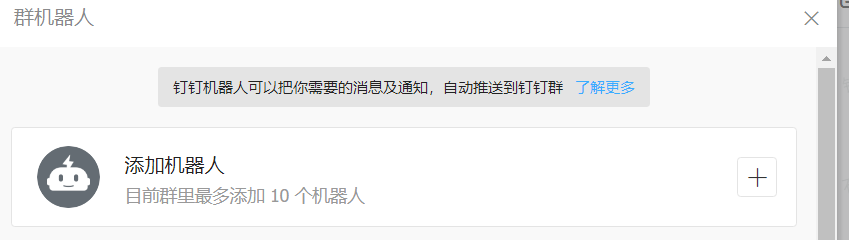
                                    # 添加机器人

                                    img_9.pngimg_10.png

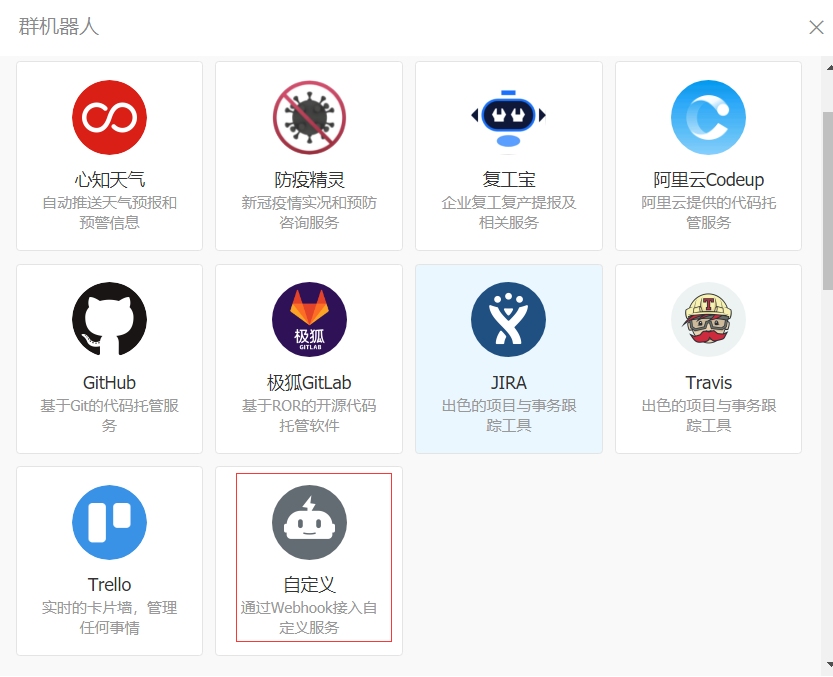
                                    # 选择自定义机器人

                                    img_11.png

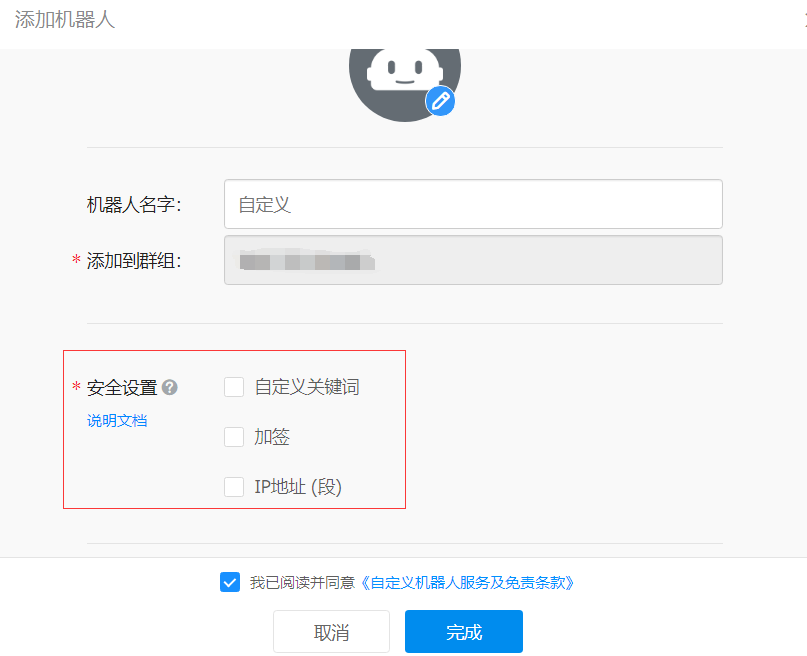
                                    # 获取Webhook地址

                                    https://open.dingtalk.com/document/robots/customize-robot-security-settingsopen in new windowimg_12.png
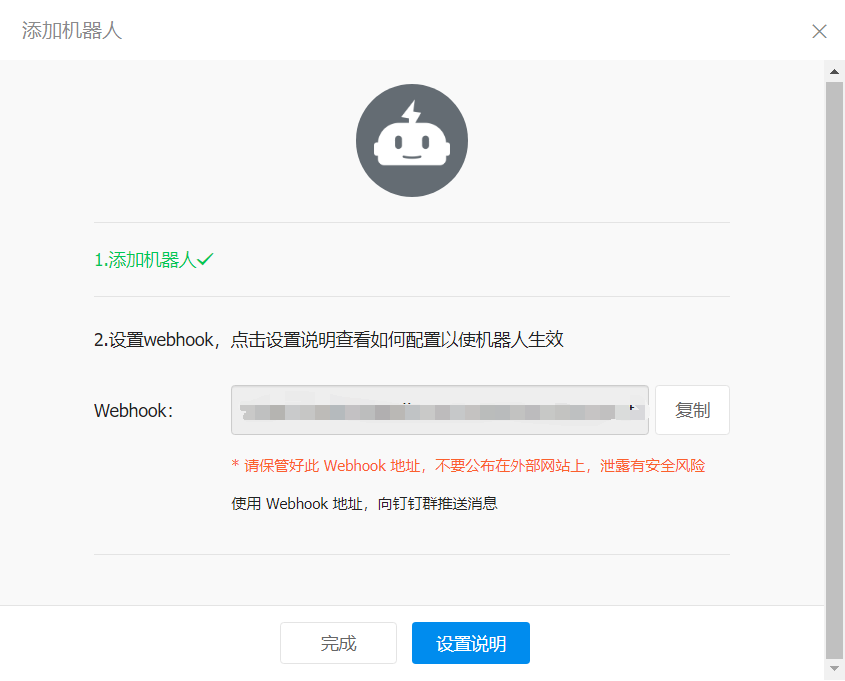
                                    # 复制地址

                                    可用于向这个群发送消息,格式如下

                                    https://oapi.dingtalk.com/robot/send?access_token=XXXXXX
                                    
                                    1

                                    img_13.png

                                    # 发送代码

                                    # python版本

                                    import time
                                    import hmac
                                    import hashlib
                                    import base64
                                    import urllib.parse
                                    import requests
                                    
                                    timestamp = str(round(time.time() * 1000))
                                    secret = 'this is secret'
                                    secret_enc = secret.encode('utf-8')
                                    string_to_sign = f'{timestamp}\n{secret}'
                                    string_to_sign_enc = string_to_sign.encode('utf-8')
                                    hmac_code = hmac.new(
                                        secret_enc,
                                        string_to_sign_enc,
                                        digestmod=hashlib.sha256).digest()
                                    sign = urllib.parse.quote_plus(base64.b64encode(hmac_code))
                                    token = 'xxx'
                                    url = f'https://oapi.dingtalk.com/robot/send?access_token={token}&timestamp={timestamp}&sign={sign}'
                                    headers = {
                                        "Content-Type": "application/json"
                                    }
                                     data = {
                                            "msgtype": "link",
                                            "link": {
                                                "text": '点我跳转百度',
                                                "title": "点我",
                                                "picUrl": "图片链接", 
                                                "messageUrl": "https://www.baidu.com"
                                    
                                            },
                                        }
                                    res = requests.post(url=url, headers=headers, json=data)
                                    print(res.text)
                                    
                                    1
                                    2
                                    3
                                    4
                                    5
                                    6
                                    7
                                    8
                                    9
                                    10
                                    11
                                    12
                                    13
                                    14
                                    15
                                    16
                                    17
                                    18
                                    19
                                    20
                                    21
                                    22
                                    23
                                    24
                                    25
                                    26
                                    27
                                    28
                                    29
                                    30
                                    31
                                    32
                                    33
                                    34

                                    # java版本

                                    DingTalkClient client = new DefaultDingTalkClient("https://oapi.dingtalk.com/robot/send?access_token=566cc69da782ec******");
                                    OapiRobotSendRequest request = new OapiRobotSendRequest();
                                    request.setMsgtype("text");
                                    OapiRobotSendRequest.Text text = new OapiRobotSendRequest.Text();
                                    text.setContent("测试文本消息");
                                    request.setText(text);
                                    OapiRobotSendRequest.At at = new OapiRobotSendRequest.At();
                                    at.setAtMobiles(Arrays.asList("132xxxxxxxx"));
                                    // isAtAll类型如果不为Boolean,请升级至最新SDK
                                    at.setIsAtAll(true);
                                    at.setAtUserIds(Arrays.asList("109929","32099"));
                                    request.setAt(at);
                                    
                                    request.setMsgtype("link");
                                    OapiRobotSendRequest.Link link = new OapiRobotSendRequest.Link();
                                    link.setMessageUrl("https://www.dingtalk.com/");
                                    link.setPicUrl("");
                                    link.setTitle("时代的火车向前开");
                                    link.setText("这个即将发布的新版本,创始人xx称它为红树林。而在此之前,每当面临重大升级,产品经理们都会取一个应景的代号,这一次,为什么是红树林");
                                    request.setLink(link);
                                    
                                    request.setMsgtype("markdown");
                                    OapiRobotSendRequest.Markdown markdown = new OapiRobotSendRequest.Markdown();
                                    markdown.setTitle("杭州天气");
                                    markdown.setText("#### 杭州天气 @156xxxx8827\n" +
                                            "> 9度,西北风1级,空气良89,相对温度73%\n\n" +
                                            "> ![screenshot](https://gw.alicdn.com/tfs/TB1ut3xxbsrBKNjSZFpXXcXhFXa-846-786.png)\n"  +

                                            "> ###### 10点20分发布 [天气](http://www.thinkpage.cn/) \n");
                                    request.setMarkdown(markdown);
                                    OapiRobotSendResponse response = client.execute(request);
                                    
                                    1
                                    2
                                    3
                                    4
                                    5
                                    6
                                    7
                                    8
                                    9
                                    10
                                    11
                                    12
                                    13
                                    14
                                    15
                                    16
                                    17
                                    18
                                    19
                                    20
                                    21
                                    22
                                    23
                                    24
                                    25
                                    26
                                    27
                                    28
                                    29
                                    30
                                    上一页
                                    jenkins分发资源
                                    Copyright © 2021-present Evan You 石头 | 备案号 : 蜀ICP备2021021200号-2 | 友情链接 : APP开发者工具